Blog
Less AI slop, more modding
We updated Modifold's rules for AI-generated content and added a new project details page.

October 17, 2026 update: our AI rules have changed.
We assess the result, not the tools. Using AI for code, debugging, translations, and descriptions is allowed. The proportion of AI-generated code or text is no longer, by itself, a reason to reject a project. Authors remain responsible for the functionality, safety, and accuracy of what they publish.
The restriction on AI-generated or generatively edited images in project presentation remains: icons, covers, galleries, and description illustrations should use actual in-game content or your own graphics. Ordinary editing, such as cropping, color correction, text overlays, and compositing, is allowed.
Automatically displayed previews inside embedded YouTube and other third-party players are exempt. Uploading the same image separately to a gallery or using it as a cover is not exempt.
We have also updated the article below to reflect the new rules. See the Content Rules for the current wording.
The short version: we are not against AI. We are against AI slop in project icons, covers, and galleries. Images should help you understand what you are downloading, not leave you wondering whether any of it exists in the game.
AI can be a useful tool. It can help you understand an error, sketch out an idea, translate some text, or speed up the boring parts. That is fine. What matters is that the project works, is safe, and matches its description, not which tools were used to write its code.
That is why we updated our Content Rules and added a separate Details page to project settings.
What is no longer allowed
AI-generated or generatively edited images are not allowed in project presentation. This includes:
- project icons;
- gallery images;
- images in descriptions;
- any other images used on the project page.
And no, you do not need a professional designer to publish a project. An in-game screenshot or a simple icon made in Figma or Photoshop is fine. Show the project itself, not AI slop in its place.
What if you used AI?
There is no need to hide it!
Project settings now have a separate Details page. You can mark that AI was used, say what it was used for, and add an explanation if you want.
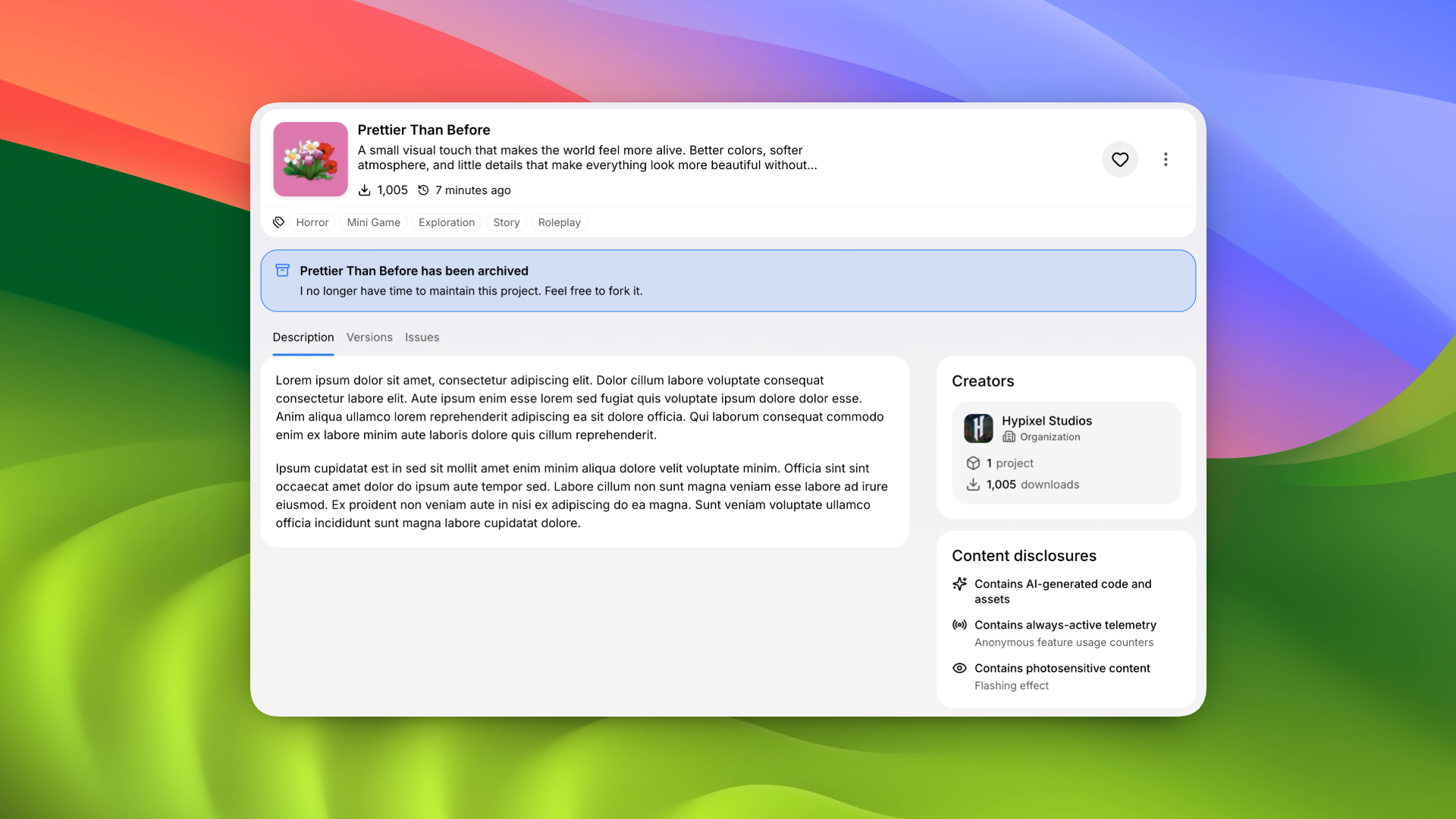
You can also add the project license, paid features, telemetry, and other important details. This information will appear on the public project page, so players know what they are downloading.
Check the result before publishing: authors remain responsible for their projects regardless of the tools they use.
Archiving projects
You can now archive a project from the same page.
An archived project disappears from catalogs, but stays on the author's profile and remains available through a direct link. Its page will show a notice that the project will no longer receive updates.
The author can leave their own message too. For example, they can explain that they no longer have time to maintain the project and that others are free to fork it. If no message is added, we will show the standard archive notice.
This is better than deleting old work or leaving players to guess whether a project is still alive.
Why are we doing this?
So you know what you are getting before you download something.
It is better to know about data collection and paid features upfront instead of finding out after installation or stumbling across it at the bottom of a description. Screenshots should show what the project looks like in the game.
We want to see your ideas, your experiments, and your weird projects that somehow work perfectly at 3 AM and break again in the morning. Using AI in development? That is fine. Just show players what they will actually get.
Less slop. More modding.