Getting Started
First thing you’re going to wish to have is the Crude Hex Staff. It will teach you the basics, and that’s about ALL it will teach you. While limiting, it is a quick and cheap way to get into hexcode.
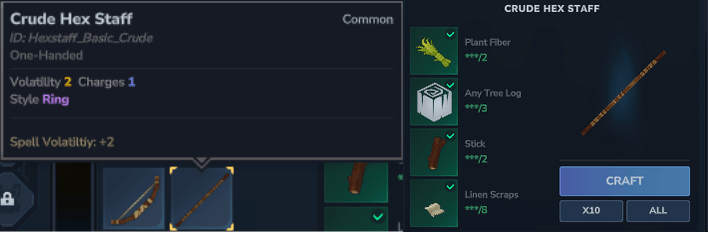
- Volatility: is how large your hexes can be. More volatility = More Glyphs. Volatility is ticked down PER GLYPH that is executed.
- Style: This is how the glyphs form around you. There are currently three styles. Look at Hexcode Info Document for more information about the different styles.
- Charges: This is how many active hexes you can have at once. Mana: Staffs do not give you mana, only Armor and Books do. You start with 100 mana by default.
Creating your first Glyph
Terminology: A Glyph is simply a shape - or collection of shapes - you have drawn to do ONE effect
Holding your staff, press Secondary (RMB) to enter “Casting Mode” - this is where you will Select and Assemble your glyphs. Then, hold Primary (LMB) - while not hovering over another glyph - and drag to make a shape. Wait ~1s for the shape to appear (like below)
Terminology: Casting Mode is simply the selection phase to choose which hex to execute. This will be more important later with Hexbooks
Once a shape is drawn, you can exit Crafting Mode by releasing Secondary. Now, the shape you drew is Queued. Hitting Primary again will cast the spell.
NOTE: Every time you cast your spell, it will decay a little. To reset the decay, enter Crafting Mode and draw your shape again.
Now, one shape is great and all, but let’s look at what it takes to make a Hex
Creating your first Hex
Terminology: A Hex is simply a Combination of Glyphs
First, draw a Force glyph (circle). Then, draw a Delay glyph (triangle). While still Secondary, hover over the Force glyph then press and hold Primary to drag it onto the Delay glyph. When you release Primary, it should “nest” them into one another, creating a Hex. Exit crafting mode and cast your hex. It should wait a second (delay) and then launch you (force)!
That’s it! You’ve mastered entry-level hexcode. Now create small hexes to your heart’s content. Experiment and learn how each one works. Once you are ready, you can move on to Advanced Crafting